
What This Page Does
- Shows the connected admin user for each site
- Lets you select sites, tags, or clients
- Changes the connected administrator account password
- Shows per-site success or error results
Update Admin Passwords
1
Open Admin Passwords
Go to MainWP > Users > Admin Passwords.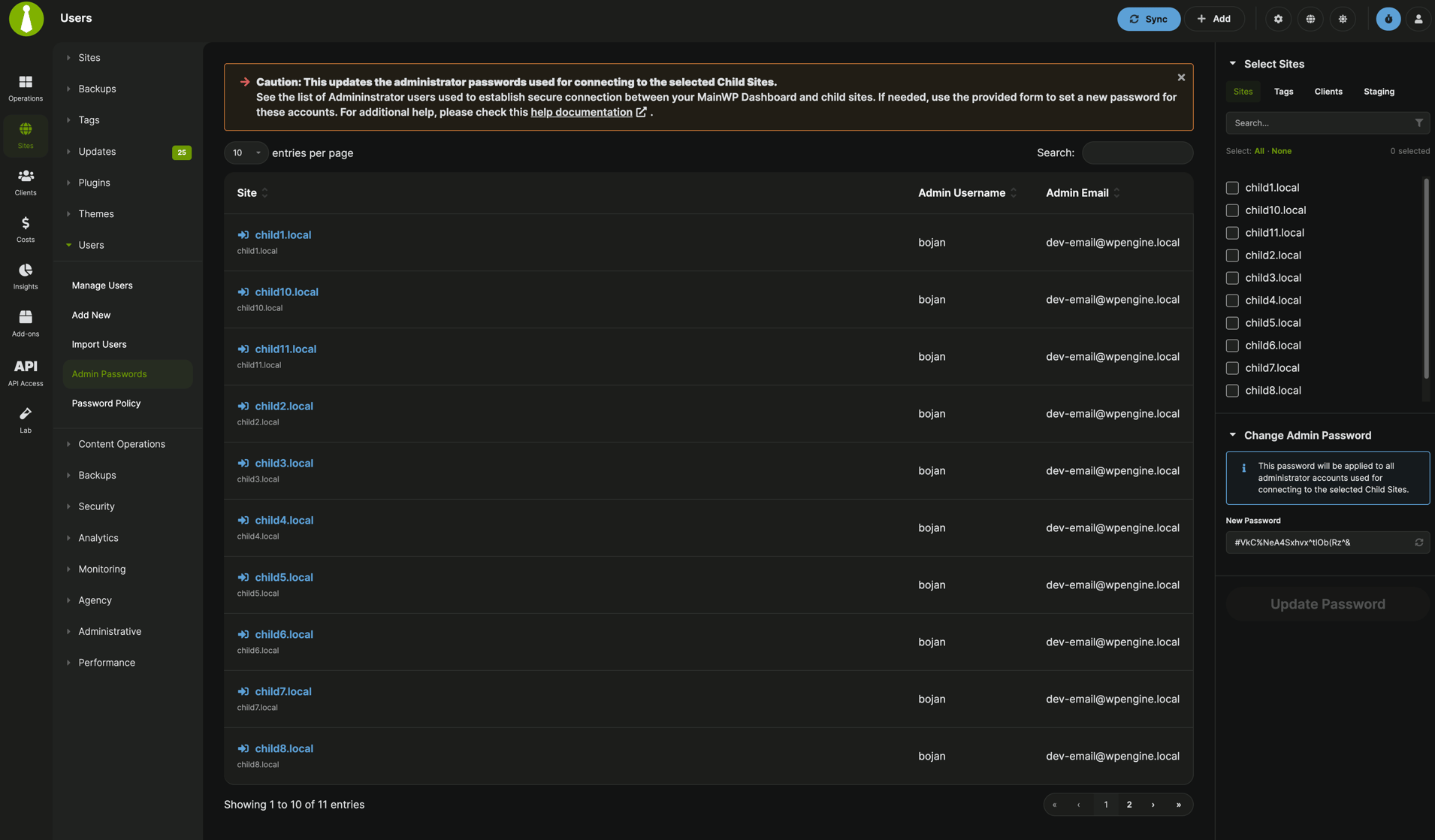
2
Select targets
Choose the Child Sites, Tags, or Clients where you want to update passwords.
3
Enter a new password
In Change Admin Password, set the password you want to apply.
4
Update passwords
Click Update Password.
5
Review results
Check the results modal for success or error on each selected site.
Validation Rules
- You must select at least one site, tag, or client
- You must provide a password
- Suspended sites and sites with sync errors are skipped
Important Notes
MainWP communication with child sites continues to use the normal MainWP secure protocol. This page updates WordPress user account passwords.Related Resources
- Manage Users - Manage user accounts across child sites
- Password Policy - Configure password change reminders